

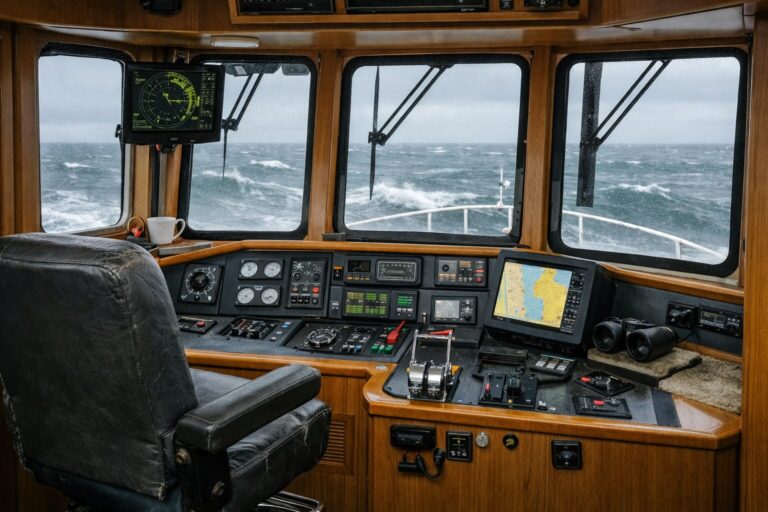
Upgrading a pilothouse seems straightforward until one improvement directly degrades another function. Adding a larger chartplotter display often clips forward sightlines over the bow. Installing a wider, more cushioned helm chair can block the companionway or pin an arm against a side console. Extending a settee table can trap the off-watch crew or choke off the clear path between port and starboard side doors.
A pilothouse is a compact, highly integrated workspace where ergonomics, vessel operations, and living space overlap. A change can affect sightlines, reach, circulation or equipment access beyond its immediate purpose. Evaluating those consequences together helps you identify questions before committing to work.
Isolating the Operational Problem Before Changing Hardware
Equipment changes should solve a specific physical posture or operational task, not a vague sense of dissatisfaction. When an owner feels fatigued or awkward after a long passage, the immediate impulse is often to buy hardware—a taller chair pedestal, a larger multifunction display, or an auxiliary control head.
Target the specific motion that creates friction before specifying changes:
-
Long-range watchkeeping: Are you craning your neck because the seat base is too low to see over the foredeck gear, or are reflections on the windshield glass washing out your view?
-
Close-quarters maneuvering: Are you forced to stand at an odd angle because the engine controls, thruster switches, and rudder indicators cannot all be reached while maintaining direct visual contact with the dock?
-
Task-switching under way: Does zooming in on a chart or adjusting radar gain require unbuckling a harness or leaning forward out of the lumbar support?
-
Shared helm routines: Does having an off-watch companion cross the pilothouse force the helmsman to shift their elbows or alter their scan?
Isolating the root cause prevents replacing parts that work fine within their intended operational envelope. If you are still defining how your crew shares watchstanding, line handling, and interior transits, reviewing Is a Pilothouse Right for Your Cruising Routine? A Stationary Onboard Walkthrough can help clarify those baseline operational demands before you start modifying hardware.
The Console Triad: Seat Height, Sightlines, and Reach
Adjusting the helm console requires balancing three tightly linked variables: your seated eye level, the line of sight over the dashboard, and your physical reach to primary controls. Changing one can affect the others.
-
Sightline: What can you see in your normal seated and standing positions?
-
Seat: How do height, travel and footprint affect posture and movement?
-
Console: How do the display dimensions and control positions affect view and reach?
Display Footprints Versus the Forward Horizon
Modern multifunction displays pack immense operational data onto single screens, tempting owners to specify the largest glass bridge possible. Yet mounting taller screens on an existing dash flat frequently raises the console brow or encroaches into the vertical viewing angle.
When you sit at the helm, the lower boundary of your forward vision should comfortably clear the anchor windlass, bow rails, and deck gear when running at trim. If an oversized display forces you to raise the helm seat to restore that view, your legs may hit the underside of the wheel, or your feet may dangle clear of the footrest.
For a specific equipment example, our 49 Pilothouse equipment includes Garmin chartplotters, autopilot, radar, fish finder and VHF radios. Ask about the current specification and assess the installation on the actual boat. Changing display sizes later requires re-checking that stationary sightline across both seated and standing operating postures.
Helm Seating Profiles and Control Arc
The space dedicated to seating dictates your posture relative to the throttles, thruster controls, steering wheel, and display interfaces. In our 49 Pilothouse, the pilothouse has room for two Stidd or Llebroc helm seats. Try the actual seats to assess comfort and the effects of their footprint:
-
Operator position: Check reach and view from the actual seat position.
-
Adjustment range: Check the effects of height and fore-and-aft adjustments together.
-
Standing space: If the chair has a bolster or other mechanism, see how it works within the available space.
Testing Footpaths and Service Access Under Real Living Conditions
The paths through a pilothouse vary by layout. Check whether routine movement crosses the operator’s working area; on most NP49 layouts, accommodations are accessed from the salon. Optimizing the bridge for stationary seating often compromises crew movement or buries access points for shipboard systems.
Crew Transit and Door Clearance
In our 49 Pilothouse interior, the arrangement balances functional helm operations with an L-shaped settee and table, served by two opening side doors and three sliding windows. The two opening doors and three sliding windows are features to examine alongside the seats and table.
When planning additions—such as a larger settee table, extra chart drawers, or bulkier companion seating—map out the actual walking path across the pilothouse:
-
Door swings and tracks: Does the throw of a modified helm chair block the path to the starboard side deck door during an abrupt docking approach?
-
Settee egress: Can an off-watch crew member step away from the L-shaped settee for a night watch relief without forcing the seated helmsman to lean forward or vacate their seat?
-
Companionway flow: Does lowering or swiveling a chair interfere with the actual companionway route in the selected layout?
Opening doors and sliding windows assist crew coordination and air exchange, but they do not eliminate the need for disciplined physical layout planning. If an interior addition bottlenecks traffic between the helm and the side deck, that conflict deserves discussion before proceeding.
Protecting Documented Equipment Access
Equipment behind a console may require service, calibration or replacement. Identify what is actually installed and where its documented access points are.
Before committing to custom cabinetry, permanent monitor mounts, or fixed enclosures, locate the documented access panels and removable headliners.
-
Access panels: Check that proposed mounts or cabinetry do not cover the panels needed for the actual equipment.
-
Headliners: Ask how a proposed overhead addition affects removal and access to existing cable runs.
Building a Coordinated Specification Instead of Piecemeal Tweaks
The most successful helm layouts result from treating every modification as a linked specification. Rather than authorizing individual electronics installers or joiners to make isolated changes, approach modifications with a complete set of paired physical measurements.
Work through this physical checklist at the helm while stationary:
-
Step 1: Record operational sightlines. Sit in your natural cruising posture. Mark the horizon line, the bow rail profile, and any blind spots created by display bezels or windshield mullions. Repeat this check while standing.
-
Step 2: Map your reach envelope. Keep your back against the seat lumbar support. Verify that the chartplotter touch interface, VHF mic, engine controls, and thruster toggles are reachable without extending your shoulder past its natural range.
-
Step 3: Simulate heavy crew traffic. Have a second person use the doors, move past the helm chair, sit at the settee and follow the actual companionway route in the selected layout. Note every point where bodies touch furniture or block control access.
-
Step 4: Trace the service paths. Confirm which joinery panels, access hatches, or headliners must drop down to reach the backs of the displays, steering helms, and circuit breakers.
Bring concrete, paired observations to us or your marine electronics technician so the proposed change can be evaluated as a whole. If you are reviewing a specific layout or planning modifications for an upcoming build, talk with us about how the choices fit the particular boat and your routine.