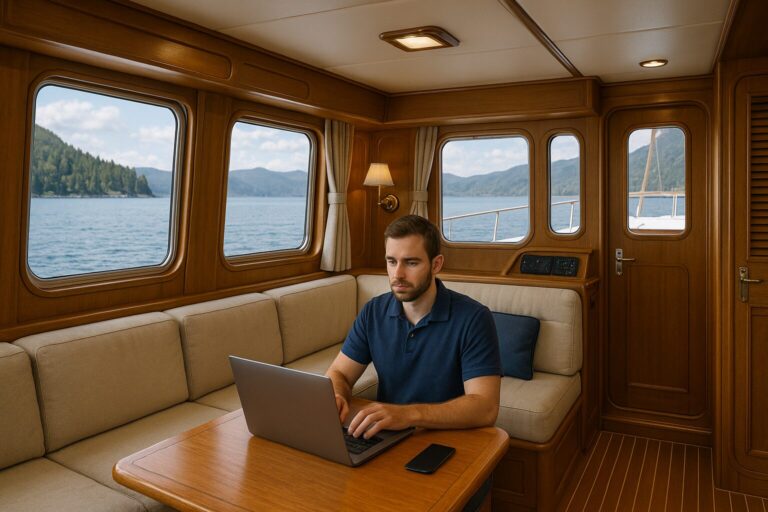
Remote work from an offshore or coastal yacht fails when owners plan around an idealized vacation rather than their most demanding workdays. Taking a quick Friday afternoon email check while swinging gently at anchor in sunny conditions is easy. Managing four hours of client video calls, downloading multi-gigabyte data sets, and resolving a software deployment during a squall with family members preparing lunch in the salon is a completely different reality.
Before committing your livelihood to the water, you must stress-test your professional routine against real marine operating constraints. That means testing hardware draw, network latency, acoustic isolation, and your own physical bandwidth under normal cruising conditions.
Define Your Core Job Requirements
Start with your least flexible responsibilities. If your job depends on asynchronous written updates in tools like Slack, GitHub, or email, your technical requirements are forgiving. If your schedule requires back-to-back video presentations, screen sharing, or low-latency virtual desktop connections, your hardware and anchorage selections narrow immediately.
Audit your typical work week across four concrete categories:
-
Fixed meeting schedules: Determine how many hours a day you must be online at a specific minute. If you cannot miss a recurring 9:00 AM stakeholder sync, your work schedule needs to accommodate weather, arrival uncertainty and the boat’s operating needs.
-
Bandwidth and data volume: Separate your download requirements from your upload needs. High-resolution design assets, engineering builds, raw media files, or large database backups chew through standard mobile data caps rapidly and demand high sustained upload speeds.
-
Confidentiality and noise boundaries: Analyze who you speak with and what you discuss. Client confidentiality, internal personnel reviews, and contract negotiations require a closed door. If your boat layout lacks an isolated space away from the main living area, private calls become a logistical headache for everyone aboard.
-
Shore fallback protocols: Build a realistic plan for unavoidable network outages. If an antenna fails or a local cell tower goes dark an hour before a critical deadline, know whether you have a secondary backup connection, a nearby harbor with shoreside workspaces, or the professional latitude to reschedule.
Test Connectivity Across Your Cruising Grounds
No single antenna, cellular provider, or satellite network delivers uninterrupted high-speed broadband in every harbor and coastal passage. Assess whether complementary connection options would help your work routine, and understand the limitations of each.
| Connection Type | What to Test | Limitations to Check |
|---|---|---|
| Marina Wi-Fi | Performance from the actual berth during work hours | Access terms, congestion and upload performance |
| Cellular | Coverage and usable performance in intended work locations | Provider coverage, terrain, equipment and data terms |
| Satellite | Actual calls and uploads with the installed equipment | Clear view, regional permissions, service plan and data allowance |
Satellite systems like Starlink have expanded where professionals can work, but they introduce operational boundaries that require careful planning. Offshore use depends heavily on your specific antenna hardware, regional regulatory authorizations, and your provider’s current ocean service terms. Offshore data packages, mobility limits, and port-state permissions shift regularly; assuming you will have endless streaming anywhere on the water will eventually leave you without service.
Bandwidth for work must never be confused with life-safety equipment. An interrupted Zoom call or a delayed email update is merely an operational annoyance, but relying on consumer-grade internet hardware for passage safety is hazardous. For mission-critical weather routing, vessel tracking, and emergency distress systems, review our recommendations in Navigation and Communications Redundancy for Remote Cruising.
Separate Professional Duties from Boat Operation
Safe passage-making requires an alert, active watch; you cannot safely run a boat while typing, reviewing spreadsheets, or wearing noise-canceling headphones. Even with modern auto-routing and radar alarms, the helm demands direct human attention to monitor traffic, floating debris, changing weather, and vessel systems.
Working while underway creates friction across several areas:
-
Lookout integrity: An enclosed, comfortable pilothouse provides shelter from rain and wind, but that comfort does not replace a vigilant watch or justify running through rough conditions to make a scheduled call. When the boat is underway, the person on watch has one job: operating the vessel.
-
Acoustics and vibration: Even well-insulated engine compartments generate background low-frequency hums and hull harmonics under load. Laptop microphones pick up engine drone, thruster activation, and running gear noise, making professional conversations difficult.
-
Physical motion and fatigue: Reading text and typing while a displacement hull rolls in a quartering sea frequently triggers motion sickness, even in experienced boaters. Motion can make screen work slower or uncomfortable; test your response before relying on it.
-
Shared living flow: If your workspace is set up on the salon dinette table, every crew member moving between the galley, head, and cockpit walks directly through your office.
Effective remote work demands physical boundaries. A dedicated pilothouse settee table can function well as a quiet office while swinging on the hook, separated from the galley below. Underway work must not interfere with navigation, proper lookout or other operating duties. Keep the working arrangement separate from the watchkeeper’s responsibilities; pause work when the crew or conditions do not support that separation.
Calculate Office Loads in Your Electrical Budget
Laptops, secondary monitors, external drives, and communication systems are constant parasitic loads on your house battery bank. Running an office off-grid changes your energy consumption profile significantly, especially when working from remote anchorages for days at a time.
-
Record the actual workstation and network equipment used.
-
Measure consumption over a representative workday.
-
Include other boat loads and available charging.
-
Decide how a loss of power or connection changes the work plan.
Leaving network equipment operating continuously can add a substantial load. Compare its measured use with the existing boat routine before assuming the available battery and charging capacity is enough.
Include inverter and charging losses where relevant. Discuss appropriate power supplies for the actual laptop and network equipment; a direct-current connection is useful only when compatible and correctly installed.
To understand how these continuous office draws interact with charging cycles, alternators, and generator run-times, see our guide on Shore Power, Inverters, and Battery Routine: How to Stay Comfortable Between Marinas.
Run a Realistic Five-Day Trial Week
Before transitioning your job to the water, run a simulated work week aboard under ordinary conditions. Do not treat this trial as a vacation where you fit in an hour of email between dinghy rides; run your full professional schedule while managing everyday vessel maintenance.
Structure your test to reveal operational friction points:
-
At the dock: Test actual meetings, uploads, privacy and the network equipment you intend to use. Measure power without compromising essential boat systems.
-
At anchor: In a suitable, well-planned setting, observe how motion, noise and available power affect the workday. Do not choose exposure simply to stress-test an office.
-
On a passage day: Test whether work can pause for the boat’s operating needs and resume after arrival, with room for weather delays.
During this week, test how you handle dropped connections. Intentionally spend one full afternoon working on offline tasks—drafting documents, reviewing cached code, or organizing project files—to see if your job can tolerate satellite signal blockage behind a high bluff or a temporary hardware reset.
Working aboard is inseparable from the overall realities of living aboard. Balancing maintenance chores, holding tank capacities, and grocery provisioning alongside daily professional deadlines requires realistic personal habits. To evaluate whether your broader domestic routines fit this lifestyle, review Can You Live on a Trawler? What to Verify Before Moving Aboard.
Prioritizing Yacht Layouts for Daily Work
Making a yacht a viable long-term workplace comes down to layout versatility. When stepping through our current models, look closely at how the interior arrangements manage personal separation, sightlines, and practical desktop space.
Check whether the particular boat has a useful desk space, adequate privacy and a workable separation from shared living areas. A pilothouse or stateroom may serve that purpose when the layout and use permit it; neither should be assumed to function as an office from the yacht style alone.
Every professional brings a unique set of constraints to the water. Cruising grounds dictate your connectivity options, your crew profile determines how much privacy you need, and your job responsibilities establish your daily power budget. When you are ready to evaluate how your remote career aligns with a long-range pilothouse trawler, talk with us to discuss your plans, layout priorities, and ideal cruising setup.